
War Thunder Custom Skins: How to Personalize Your Vehicles
Give your favorite War Thunder vehicles a personalized appearance with user-created skins. Learn where to find designs, how to install them, and what to check before downloading files.
Vehicle appearance is a big part of War Thunder's appeal. Some players prefer historically accurate camouflage, while others want distinctive designs that make their favorite aircraft, tanks, and other vehicles look different.
War Thunder offers community-created customization resources, including user skins. Understanding how these skins work helps you personalize your vehicles without confusing visual customization with software that changes gameplay.
What Are War Thunder Custom Skins?
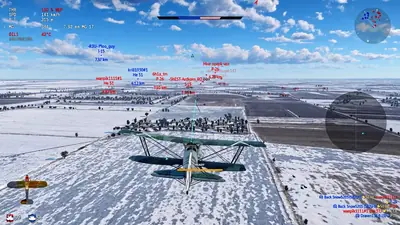
Custom skins are visual designs that change the appearance of a supported vehicle. They can include camouflage patterns, historical markings, colors, and other decorative details.
Community creators produce skins for different vehicles and themes. Depending on the design, you might find a historical military paint scheme, a camouflage pattern suited to a particular environment, or a creative interpretation of an existing vehicle.
A skin is different from an aimbot, ESP tool, or other gameplay modification. A visual design does not inherently improve aiming, reveal hidden enemies, or change a vehicle's performance.
Where Can You Find War Thunder User Skins?
The official War Thunder community portal, Live, is a useful starting point for exploring community-created content.
Official references: War Thunder Live, War Thunder wiki, game FAQ.
When looking for a design, consider the following:
- Vehicle compatibility: Confirm that the skin was made for the exact vehicle you use.
- Visual style: Choose between historical camouflage, modern military patterns, and creative designs.
- Preview quality: Check screenshots to understand how the design looks from different angles.
- File information: Read the creator's instructions before downloading or installing anything.
- Recent feedback: Look for indications that the design works with the current version of the game.
Avoid downloads from suspicious mirrors or pages that bundle unrelated executable programs with simple visual files.
How to Install a Custom Skin
The exact steps can vary by game version and vehicle, so follow the current instructions for the specific skin you choose.
Step 1: Select a compatible vehicle
Open your vehicle collection and identify the vehicle you want to customize. Check that the skin supports that specific model and variant.
Step 2: Generate a user-skin template
In versions of War Thunder that support the standard user-skin workflow, the vehicle customization interface provides an option to create a template for the selected vehicle.
Use the in-game option rather than guessing the directory or creating an unrelated folder manually.
Step 3: Download the skin files
Choose a design from a reputable source and read the installation instructions. Make sure the download contains the expected visual files rather than an unfamiliar executable.
Step 4: Place the files in the appropriate location
Follow the creator's instructions and the game's current user-skin workflow. Folder names and file structures may differ between designs.
Step 5: Select the design in the game
Return to the relevant vehicle customization menu and look for the available user-skin selection. If the skin does not appear, check the folder structure, vehicle compatibility, and installation instructions.
Why Is My Custom Skin Not Showing?
A missing skin does not necessarily mean the game is broken.
Common causes include:
- Incorrect vehicle selection. A skin made for one variant may not work on another.
- Incorrect folder structure. Files placed in the wrong directory may not be recognized.
- Missing files. A download may be incomplete or extracted incorrectly.
- Outdated instructions. A guide written for an older version may no longer describe the current interface accurately.
- Unsupported customization. Not every design or modification is supported in every context.
Start by checking the original instructions and the official documentation before reinstalling the game.
Can Other Players See Your Custom Skin?
Do not assume that every custom skin will be visible to everyone else in a multiplayer battle.
Visibility can depend on the type of customization and how War Thunder handles the relevant content. Some user-created visual changes are intended primarily for the player who installs them.
If seeing the design is important to you, check the official documentation for that specific customization method. A local appearance change should not be advertised as a guaranteed way to change how every other player sees your vehicle.
Do Custom Skins Affect Gameplay?
A conventional visual skin changes appearance rather than vehicle performance. It does not automatically improve armor, increase speed, or make weapons more effective.
Visual customization should also be distinguished from prohibited modifications that change gameplay, automate actions, or interfere with the game's intended operation.
Before installing any third-party software, check the game's current rules and make sure you understand what the program actually changes.
Tips for Choosing a Good Skin
Choose a design that suits the vehicles and environments you enjoy. Historical enthusiasts might prefer period-appropriate markings, while players who enjoy creative designs might choose brighter colors or unusual patterns.
Check the preview images carefully. A design that looks impressive in a thumbnail might not look as good when applied to the entire vehicle.
It is also worth keeping your customization files organized. That makes it easier to remove a design if it stops working or you decide to try something else.
Conclusion
War Thunder custom skins offer a way to personalize your favorite vehicles without changing their underlying gameplay mechanics.
Start with reputable community resources, verify vehicle compatibility, follow the appropriate installation instructions, and avoid downloads that bundle suspicious software with visual files.
With a little care, you can give your vehicles a distinctive appearance while keeping customization separate from prohibited gameplay modifications.